
How to Attach a File or Document to a Webform Email Notification
-
1
Create the File
Create the file using the appropriate software application. Make sure that the document is accessible to people using assistive technology.
AccordionText Spreadsheet Calendar Web, Media, & Other - .doc
- .docx
- .ppt
- .pptx
- .rtf
- .txt
- .csv
- .xls
- .xlsx
- .ical
- .ics
- .eps
- .json
- .kmz
- .mp3
- .xml
- .zip
Calendar .ics files can be created in one of two ways:
- Outlook can produce an .ics file for a scheduled meeting. Outlook tutorials are widely available online.
- Digital Commons can produce an .ics file from an existing Event. The Event can be in a draft state, it does not need to be published first.
How to Get an .ics File from a Digital Commons Event

Enlarge Image - Navigate to the desired Event.
- Find Add to calendar: and select the Outlook icon.
- An .ics file will download to your computer. Most web browsers will display the downloaded item in the top right corner of the window under Downloads, as shown below. If you cannot find the file there, check the Downloads folder on your device.
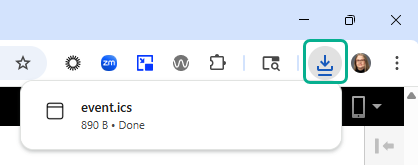
Downloads as they appear in the Chrome browser. -
2
Upload the File to the Media Library
- Navigate to Content > Media > Add Media > Document
- Fill all required fields marked with an asterisk(*).
- Name*- Enter a name for the document.
- Document*- Choose File to upload.
- Complete Document Organization fields as desired. Contact your agency Web Manager for guidance.
- Select the Save button.
-
3
Customize Webform Email Handlers
- Navigate to Admin > Structure >Webform
- Find and select the desired Webform.
- Select Settings > Emails/Handlers.
- Under Title/Description, find the desired confirmation email and select Edit.
- In the right panel, go to the Message section.
- For Body*, select Custom body...
- Go to the Text Editor.
Create a Link
- Text Editor- Add a link with or without button styling using the Text Editor. Be sure to use link text appropriate for the document being downloaded. Examples:
- Link: Add to Calendar
- Button Link: Add to Calendar
Save & Test
- Save the Email Notification Handler.
- Save the Webform.
- Test the Webform.
Accordion